
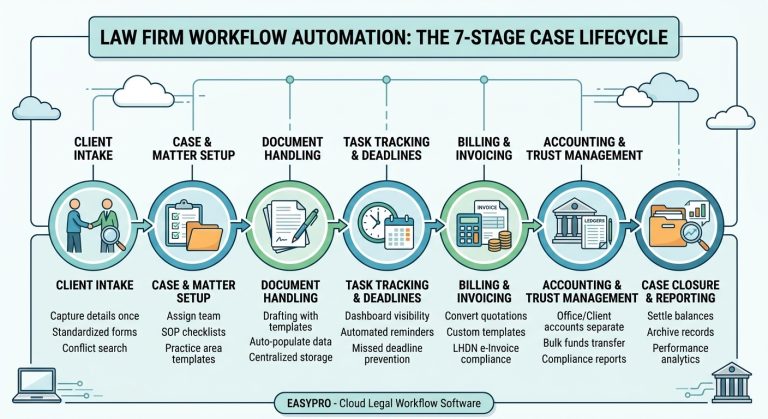
Law Firm Workflow Automation: From Client Intake to Case Closure
Every case a law firm handles moves through the same basic lifecycle: a client comes in, a matter is opened, work gets done, the client gets billed, and the file eventually closes. On paper, that sounds simple. In practice, this journey is often held together by scattered Excel sheets, paper forms, sticky notes, and a lot of manual follow-up — which is exactly where cases fall through the cracks, deadlines get missed, and billing gets delayed.
Law firm workflow automation doesn't replace legal judgment — it removes the repetitive administrative work around it, so fee earners spend more time practising law and less time chasing paperwork. Here's what that looks like at each stage of a case, and how a platform like EasyPro supports it for Malaysian law firms.
Why Manual Workflows Break Down (and Why Law Firm Workflow Automation Helps)
Before looking at automation, it's worth naming the problem it solves. Firms relying on manual processes typically run into:
- Duplicated data entry — client details re-typed across intake forms, billing systems, and case notes
- Lost visibility — partners unsure which files are overdue, unbilled, or awaiting client response
- Inconsistent processes — every fee earner handling intake or billing slightly differently
- Delayed billing — invoices prepared weeks after work is completed, hurting cash flow
- Compliance gaps — trust accounting errors or missed e-Invoice steps due to manual handling
Automating the workflow doesn't mean removing people from the process — it means giving every file a consistent, trackable path from the moment a client walks in to the moment the matter is closed.
Stage 1: Client Intake
The intake stage sets the tone for the entire matter. Automated intake typically involves:
- Centralised client records — instead of saving contacts in scattered spreadsheets, new client details are captured once and linked to every document, invoice, and receipt tied to that client going forward
- Fast lookup and search — a searchable client database means staff aren't digging through files to confirm past matters or contact details
- Standardised onboarding — using a consistent intake process (and checklist) so no required document or piece of information is missed before a file is opened
This is where EasyPro's linked client records come in — each client's information connects directly to their case files, invoices, and receipts, so nothing needs to be re-entered later in the process.
Stage 2: Case & Matter Setup
Once a client is onboarded, the matter itself needs to be structured — and this is where an SOP checklist becomes valuable. Rather than relying on memory or informal habits, a standardised checklist ensures every new matter follows the same required steps, regardless of which fee earner opens the file.
Automated case setup typically includes:
- Assigning the matter to the right fee earner or team
- Applying a standard checklist based on practice area (conveyancing, litigation, corporate, etc.)
- Setting key deadlines and reminders from day one
Stage 3: Document Handling
Legal work is document-heavy, and this is one of the biggest time drains without automation. A workflow-driven system speeds this up through:
- Template libraries — preloaded, customisable templates for court documents, letters, and agreements
- Draft generation — auto-populating documents with client and case details to minimise clerical errors
- Centralised storage — every document tied to a case or client stored securely in one place, instead of scattered across desktops and email threads
EasyPro's Draft Generator and Template Library handle this directly, letting firms auto-draft and print documents in a single click rather than manually reformatting the same letter or agreement for every new matter.
Stage 4: Task Tracking & Deadlines
Missed deadlines are one of the costliest risks in legal practice. Automated workflows reduce this risk through:
- Centralised deadline tracking — every task and court date visible in one dashboard, not buried in individual inboxes
- Automated reminders — alerts sent for upcoming deadlines or overdue tasks, rather than relying on someone remembering
- Team-wide visibility — partners and supervisors can see at a glance which files are on track and which need attention
An Analytics Dashboard that surfaces daily operations and overdue-task reminders means nothing depends purely on individual memory or informal check-ins.
Stage 5: Billing & Invoicing
Billing is often where firms lose the most time — and the most revenue, through delayed or forgotten invoices. Automating this stage involves:
- Quotation-to-invoice conversion — turning an agreed quotation into an invoice with minimal re-entry
- Customised billing templates — professional, consistent invoices generated directly from case and time data
- Advance payment tracking — visibility into deposits, advance billing, and outstanding balances
- E-Invoice compliance — automatically formatting and validating invoices in line with LHDN requirements
EasyPro's billing and quoting system connects directly to case data, so invoices don't need to be manually rebuilt from scratch, and quotations can be converted into e-Invoice-compliant bills with a single click.
Stage 6: Accounting & Trust Management
Behind every case is a financial trail that needs to be accurate and auditable — this is non-negotiable for Malaysian legal compliance. Automated accounting workflows typically cover:
- Separated office and client accounts — kept distinct by design, not by manual discipline
- Bulk fund transfers — processed with clear records and audit trails, particularly relevant for conveyancing firms handling multiple client transactions
- Instant financial reports — client ledgers, trial balances, and profit & loss reports generated on demand rather than compiled manually at month-end
Stage 7: Case Closure & Reporting
Closing a file isn't just marking it "done" — it involves confirming outstanding balances are settled, documents are archived, and the matter is properly recorded for future reference. Automated closure workflows help by:
- Flagging any unbilled time or outstanding invoices before a file is closed
- Archiving documents in a searchable, centralised system for future retrieval
- Feeding closed-matter data into firm-wide analytics — revenue reports, incentive reports, and performance tracking — so partners can see which practice areas are actually most profitable
Why This Matters for Malaysian Firms Specifically
Beyond general efficiency, law firm workflow automation addresses challenges that are particularly relevant in the Malaysian legal context:
- E-Invoice compliance is now a recurring operational requirement, not a one-time setup — automation keeps billing aligned with LHDN's e-Invoice ruleswithout manual double-checking
- Trust account discipline is a regulatory expectation, and automating the separation between client and office accounts reduces the risk of human error
- Hybrid and remote work means fee earners need access to case files and billing status outside the office, not just from a single desktop terminal
Law Firm Workflow Automation with EasyPro
EasyPro is built around this exact lifecycle — case management, client management, document automation, billing, and accounting all connected in one cloud-based system, rather than stitched together from separate tools. Because every stage feeds into the next (client records flow into case files, case files flow into billing, billing flows into accounting reports), firms get a single, consistent path from the first client meeting to the final closed file — with fewer manual handoffs and less room for things to slip through.
If your firm is still managing intake, billing, and case tracking as separate manual processes, a demo is often the fastest way to see how much of that workload can be automated end to end.